
Building Strong Reading Habits Outside the Classroom: The Role of Space and Routine
Reading habits do not grow by accident. You build them with structure, repetition, and the right environment. If you want…
Read MoreSparxReaders.co.uk helps students, teachers, and schools quickly access the official Sparx Reader login and signup pages. Our platform acts as a simple, reliable guide for understanding how Sparx Reader works, how to log in, and how to troubleshoot common issues, making the reading experience smoother and easier for everyone.
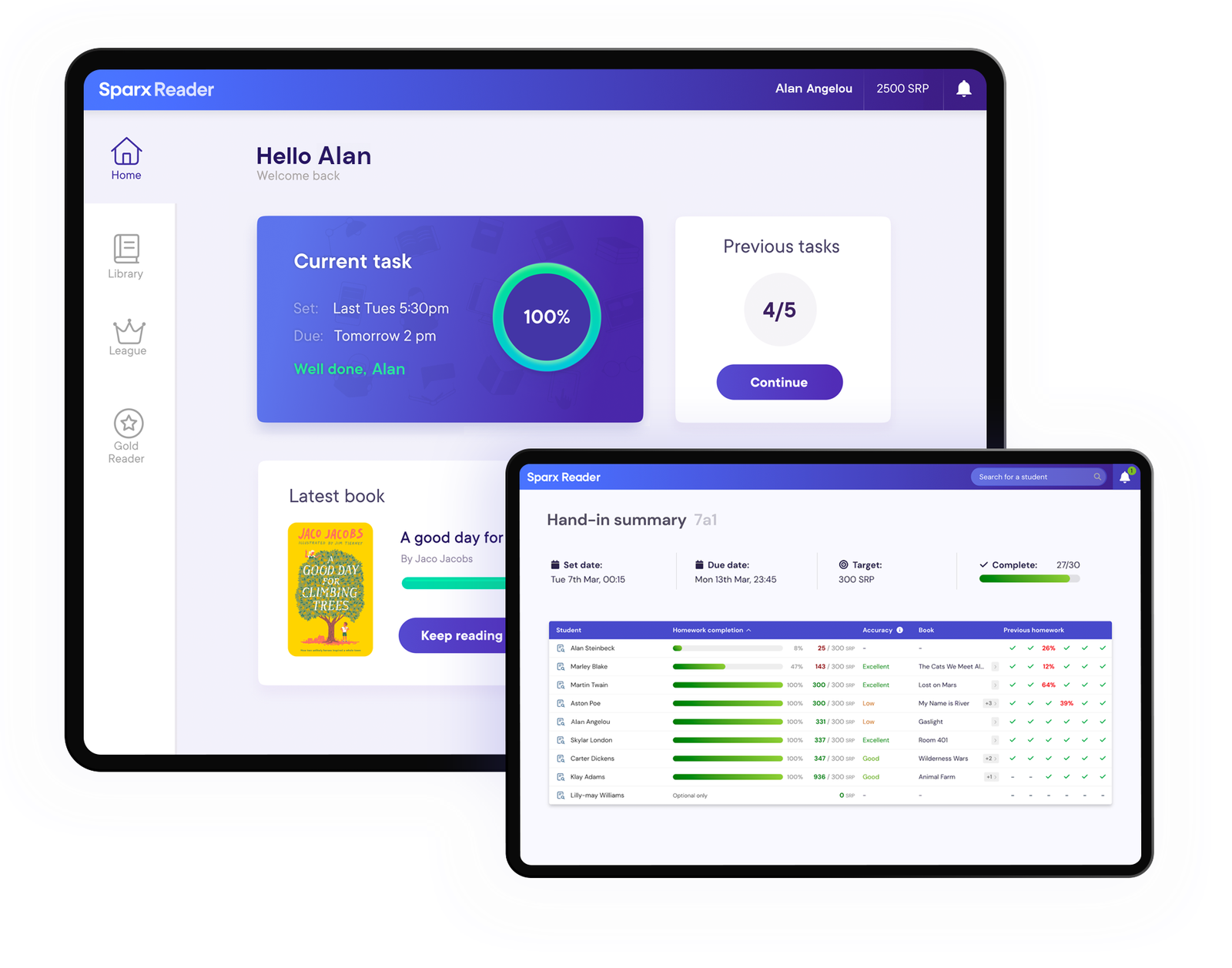
Sparx Reader is an online reading platform (digital reading programme) used in many secondary schools (ages 11–16) to build confident readers through regular practice. By blending a large library of age-appropriate e-books with interactive quizzes and progress tracking, it makes reading assignments more engaging and measurable. Sparx Reader works on any web-connected device, allowing students to access books and complete homework at home or in school. Students begin by taking a short reading test to set their level and then proceed to select books and complete assignments as described below.
Our site, SparxReaders.co.uk, serves as a friendly portal to the official Sparx Reader platform. We are not the creators of Sparx Reader (that is Sparx Learning), but we provide an easy way for students, teachers, and parents to reach the Sparx Reader login and sign-up pages directly. On our homepage you’ll find a login panel and links that take you to the official Sparx Reader site, along with this comprehensive guide explaining how the system works and why it’s used in schools. In short, we help you navigate to the right pages with minimal hassle.
The Sparx Reader experience is structured like a learning cycle. First, each student completes an Initial Reading Assessment to set a baseline reading level. This typically involves reading a passage and answering some questions. Based on the results, Sparx Reader generates a personalized reading profile and recommends books at the appropriate level. Students can then choose a book from their recommended library and begin reading it online.
Each book is broken into sections or pages. While reading, students encounter embedded comprehension questions at regular intervals. These questions check whether they understand the text. It may seem like an interruption to pause and answer questions, but Sparx Reader and educators emphasize that this actually reinforces learning by keeping students attentive. When a student answers a question, Sparx Reader immediately indicates if the answer is correct. This immediate feedback helps students learn from mistakes and stay engaged with the story.
After finishing a book and its quizzes, students see their results and earn points. The platform automatically tracks how much each student reads, their quiz accuracy, and how many books they complete. Over time, students advance through levels of achievement (often called Bronze, Silver, Gold, etc.). Reaching Gold level is a milestone indicating consistent reading success; Gold-level readers gain special privileges. For example, they may be allowed to manually add any book they read to the system and still earn points for it.
In practice, a typical week on Sparx Reader goes like this: teachers assign reading tasks based on each student’s level, students log in to read that book during the week, and then they answer the required questions and submit their homework. Each new assignment is scheduled on a regular timetable. For example, many schools configure Sparx Reader to release new reading homework every Thursday afternoon and set the due date for the following Wednesday. This weekly routine helps students build a regular reading habit.
In summary, the key steps are:
Each step is designed to reinforce careful, consistent reading. By cycling through assignments every week, Sparx Reader encourages students to make reading a regular part of their routine.

Sparx Reader includes a number of features that support reading development in schools:
Sparx Reader’s e-book library is both wide-ranging and age-appropriate. The screenshot above (the “My Library” view) shows how students browse recommended books at their level. The selection includes a mix of genres – for example, adventure novels, fantasy series, and contemporary stories. At higher achievement levels, the system even allows a student to add a personal book of their choice. This means that if a Gold-level reader prefers a paperback novel at home, they can still log that reading in Sparx Reader and earn points.
A core engaging element is the quiz and reward system. As students read, they encounter questions and gain immediate feedback. In the screenshot above, the student just answered 4 out of 4 questions correctly, earning 8 SRP points plus a first-try bonus. These points are tallied in the system and students see their total points and class ranking in real time. This game-like approach motivates many learners – it turns reading into a friendly competition, which translates to more reading practice and better comprehension in the long run.
To aid comprehension, Sparx Reader provides in-context definitions for difficult words. The example above shows a definition popup for an unfamiliar word (“phlegmatic”). Each e-book includes built-in explanations for challenging vocabulary, which helps students learn new words without stopping their reading flow. This feature makes it easier for learners to figure out word meanings immediately, reinforcing vocabulary acquisition as they read.
The platform’s accessibility features make reading easier for all students. For example, a student can enable a reading ruler, increase font size, or change the background color (the image above depicts a tinted overlay on a phone screen). Sparx Reader even offers special dyslexia-friendly fonts. Because it’s fully browser-based, students can read on a computer, tablet, or smartphone, switching devices seamlessly. These options ensure that students with visual or processing differences can comfortably engage with texts on any device.
Regular use of Sparx Reader brings many advantages for young readers:
Sparx Learning highlights that Sparx Reader is designed to be an engaging and supportive environment for literacy development. For example, a Reading Leader from Brakenhale School noted that the platform’s features help pupils “develop their reading and literacy skills… with the options to change text and background colours, enlarge the text and check the meaning of unfamiliar vocabulary”. This combination of personalization, support, and feedback helps students build the necessary life skills to succeed.
Sparx Reader also provides substantial support to educators and institutions:
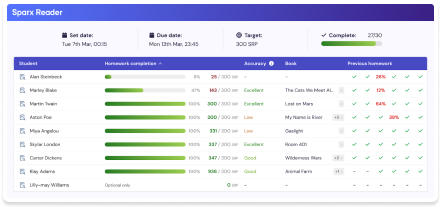
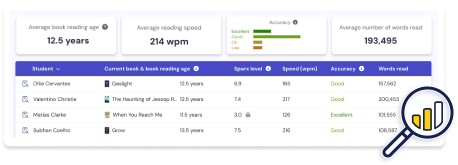
The teacher dashboard offers a snapshot of every student’s reading progress. In the example above, each student has a row showing their current book, time spent reading, and accuracy on questions. Teachers can sort or filter this list instantly. For instance, a teacher might identify which students have not yet completed their homework or which ones answered questions below a certain accuracy threshold, then follow up with those specific students.
Teachers also see powerful individual analytics. The screenshot above (the “Powerful Insights” view) shows metrics like average reading age, average reading speed, and comprehension accuracy for a class. By clicking on a student’s name, the teacher can drill down into that student’s detailed history. Such data helps answer questions like “Is this student improving over time?” or “Does this student need more practice at a certain level?” It makes instructional decisions more data-driven.
Another key feature is the automation of weekly homework. The image above is from the automation settings, where a teacher can specify the schedule for reading assignments. For example, a teacher can set Sparx Reader to assign a new book every Thursday at 3pm, automatically, to all students in a class. The system then reminds students of the homework until the due date. These built-in automations free teachers from manually tracking each deadline.
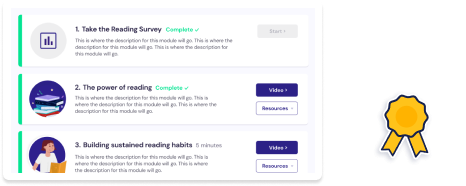
Teacher support is a focus as well. In this screenshot we see part of the Reading Matters video series interface. Sparx Reader provides short professional development videos and written guides on topics like choosing reading materials or teaching vocabulary. These materials (often called reading CPD) are included to help teachers make the most of the technology and continue sharpening their instructional techniques.
To use Sparx Reader, a student or teacher needs an account provided by their school. Typically, the school’s administrator or reading coordinator will create accounts in the system. Once you have an account, you can log in through the official Sparx Reader portal – often at a URL like reader.sparx-learning.com. On SparxReaders.co.uk we have provided a direct login panel so that users can quickly access the Sparx Reader login page.
Many schools also use Single Sign-On (SSO) to simplify login. This means students can use their Google or Microsoft school accounts. According to Sparx Reader’s documentation, SSO “enables teachers and students to log in to multiple websites using one set of login details”. In practice, this means a student may simply click a “Log in with Google” option and not need a separate Sparx password.
Here’s a quick overview of how to get started:
Because Sparx Reader is browser-based, you can use any computer, tablet, or smartphone to do your reading. For example, you could begin reading at home on a tablet and finish on a classroom desktop. Just make sure to log in with your account so your progress is saved.
If you forget your password, you should ask your teacher or the school’s IT administrator to reset it. Many schools prefer to use SSO to avoid this issue. Once logged in, students will see their weekly reading dashboard and can start or resume their homework.
Sparx Reader has been widely adopted in many schools. Sparx Learning reports that over 5.4 million hours of reading have been logged by students on Sparx Reader, spanning more than 2,600 schools worldwide. In total, students have completed more than 1.7 million books on the platform and answered over 341 million comprehension questions. These numbers highlight the high level of engagement; on average, each user has read for many hours.
In the UK, Sparx Reader is used in a large portion of secondary schools (with over half of UK schools using at least one Sparx Learning product). Internationally, Sparx Reader is also used in countries like Australia, Ireland, and several in the Middle East, wherever schools have adopted the Sparx Learning suite.
Teachers and students often share success stories. For example, schools post updates celebrating when classes hit 100% completion on Sparx Reader assignments. Some social media posts and Sparx’s community pages highlight “Sparx Reader Superstars” or class competitions. These celebrations reinforce a community spirit around reading.
For context, there are other digital reading platforms (such as Accelerated Reader or Reading Plus), but they work differently. Accelerated Reader, for example, quizzes after a book is finished, while Sparx Reader quizzes throughout. Reading Plus focuses on reading fluency and speed. Many educators choose Sparx Reader for its integrated approach (quizzes plus points plus analytics).
By making reading practice visible and data-driven, Sparx Reader has become a major tool in literacy programs. Its impact is reflected both in the usage statistics and in the positive feedback from educators. As one school leader noted, Sparx Reader’s features give pupils the tools to develop their reading skills and vocabulary.
For families, Sparx Reader provides additional support. The official Sparx Reader website includes a Parents’ Guide with videos addressing common questions, such as why quizzes interrupt reading and concerns about screen time. Sparx explains that the in-text questions are there to help ensure careful reading, and reassures parents that e-book reading can be “a force for good in teaching our young people the habit of careful and focused reading”. These resources help parents understand the purpose behind the platform’s design.
Here are some practical suggestions to make the most of Sparx Reader:
Using Sparx Reader effectively means combining the required assignments with encouragement and good habits. Over time, consistent practice on the platform leads to real improvement in reading skills.
Sparx Reader is a comprehensive platform that makes reading practice interactive and trackable. It offers personalized reading assignments with built-in quizzes, a rich library of texts, and gamified rewards to motivate students. For students, this means consistent reading practice and support; for teachers, it means insight and saved time.
Many schools have seen positive results. Sparx Learning reports millions of hours of student reading logged and hundreds of thousands of completed books. Educators appreciate the data and flexibility it provides, and students often enjoy the points and gamified elements. As one reading leader said, Sparx Reader’s accessible design helps pupils develop their literacy skills in an engaging way.
On our site, SparxReaders.co.uk, we aim to make getting started as smooth as possible. We have provided direct access to the Sparx Reader login and sign-up pages, as well as this detailed guide. If you are a student, your next step is simply to use the login panel at the top of this page with the details from your school. If you are a teacher or parent, you can use this page to understand how Sparx Reader works and how to integrate it into your reading program.
While we are not Sparx Reader ourselves, our goal is to help the Sparx Reader community get the most out of the platform. By understanding its features and following consistent reading routines, students can improve their literacy skills and enjoy their reading journey. We hope this guide has been helpful. Happy reading!
Watch this quick demo to see how Sparx Reader transforms your reading experience with innovative features, seamless navigation, and powerful tools designed for modern readers.
Sparx Reader offers personalised reading support, real-time insights, and engaging tools that help students improve comprehension, stay motivated, and progress confidently in their literacy journey.
Sparx Reader uses a smart assessment system to set personalised reading levels for every student.
Learners get books matched to their ability, helping them read confidently and improve consistently.
This personalised approach improves comprehension, boosts engagement, and ensures students always receive level-appropriate Sparx Reader tasks.
Sparx Reader includes built-in comprehension questions throughout every book to ensure students understand what they’re reading.
These quizzes improve focus, accuracy, and critical thinking. With instant feedback and SRP rewards, learners stay motivated while teachers gain clear visibility into student reading progress.
Teachers access detailed, real-time Sparx Reader analytics showing reading speed, accuracy, homework completion, and progress tracking.
The dashboard makes it easy to identify struggling readers, set targets, and monitor improvement. Schools benefit from transparent data that strengthens their overall literacy and reading programmes.
Sparx Reader’s reward system uses points, bonuses, and achievement levels to motivate students.
Correct answers earn SRP points, while progressing to Silver or Gold levels unlocks extra privileges like adding personal books.
This gamified reading experience increases student engagement and builds long-term reading confidence.
Stay updated with our latest insights and reading tips.
Reading habits do not grow by accident. You build them with structure, repetition, and the right environment. If you want…
Read More
Reading gaps are one of the major challenges in secondary education. Schools often report wide differences in reading ability of…
Read More
One of Sparx Reader’s strengths is keeping parents in the loop. The platform automatically sends emails to parents and carers…
Read More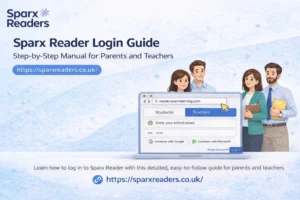
Open the official Sparx Reader site at reader.sparx-learning.com, select your school, and log in using the credentials provided by your…
Read More
When schools introduce Sparx Reader, expectations are often high. Parents hope it will improve reading habits. Teachers expect clearer insight…
Read More
At first glance, Sparx Reader looks straightforward. A student logs in, opens a book, reads, answers questions, and watches points…
Read More